


Bookkeeping & Finances
Dog grooming spreadsheet: track income, expenses, tax set-aside and mileage in Excel
This dog grooming spreadsheet shows what came in and went out each month in categories you name, without bookkeeping software. Takings per pet, quarters, a month view and a year summary are built in.
$11.99Excel workbook (.xlsx)
One payment. The files arrive by email to download. No subscription, no account.
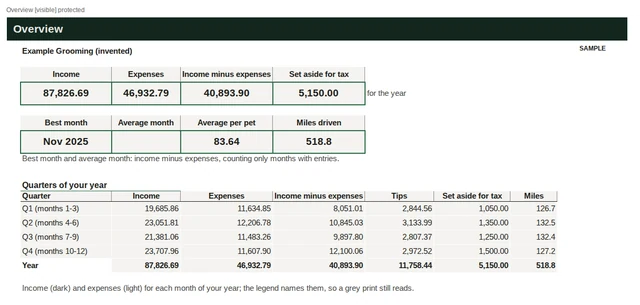
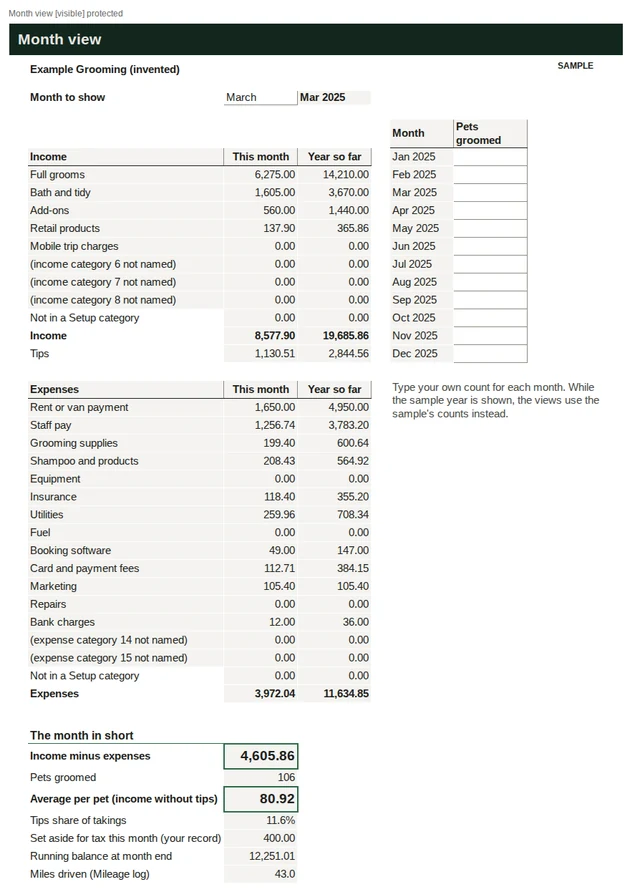
Two whole pages shown; the file has more tabs.
What does the income and expense tracker record?
The tracker has Income, Expenses, Tax set-aside and Mileage tabs. Takings are counted per pet, and the Overview shows quarters and a chart next to a month view and a year summary. A locked sample year shows how it looks before you type your own entries.
What you get, for this problem
Not knowing where the money went this month
- Income, Expenses, Tax set-aside and Mileage tabs
- Overview with quarters and a chart, month view and year summary
- A locked sample year you can switch to before you type
The download is an excel workbook (.xlsx), 11 tabs including a hidden lists tab. Everything works offline.
What is inside
- Setup and Overview
- Name your categories once; the Overview shows quarters and a chart.
- Income, Expenses, Tax set-aside, Mileage
- Entries by month. Tax set-aside records the amount and date you chose (no rate, no deadline); mileage is miles only (no rate).
- Month view and Year summary
- Average takings per pet and a year at a glance.
- Sample year
- An invented year on its own locked tab; a Show box on Setup switches every view between Sample year and My entries.
What the tracker does and does not do
It records and adds up. It sets no tax rate, gives no deductions advice and is not accounting software. Every sheet is protected without a password; only the white boxes are open.
Easy to use
A sample salon first
The workbook opens on an invented salon so you can see the results before you type your own numbers.
Easy to use
White boxes, grey formulas
Type only in the white boxes. Grey cells are formulas and are locked, so a stray click cannot break the sums.
Easy to use
Excel, nothing else
One Excel workbook (.xlsx). No design software and no extra account.
Frequently asked questions
What is the best app for managing dog grooming schedules?
Groomdiary does not sell booking software. The tracker records money, not bookings, and the Dog Grooming Appointment Book is a paper-style book for the day.
What is the best booking system for dog groomers?
The right booking system depends on how you work, and this workbook is not one. It adds up income and expenses, and the appointment book on this site handles the day on paper.
Does the tracker work out my taxes?
The tracker records and adds up, and it sets no tax rate and gives no deductions advice. The Tax set-aside tab keeps the amount and date you chose.
Can I try the workbook with sample data first?
Yes, the workbook has a locked sample year on its own tab. A Show box on Setup switches every view between the sample year and your own entries.
What do I get after I pay?
After payment you land on a thank-you page on groomdiary.com, and the files arrive by email to download. Each purchase includes a START-HERE.txt that says which file is which and how to print it. Nothing is shipped.
Do I need Excel to use the workbook?
The workbook is an Excel file (.xlsx), and Excel is what it is built for. We recalculated it in LibreOffice and did not test Google Sheets. Type only in the white boxes; the grey cells are formulas, and the sheets are protected without a password.
Get the whole desk
All 19 Groomdiary files for $49.99
Income & Expense Tracker is one of them. Bought one by one the 19 files cost $125.81. The bundle costs $49.99, or 60% less.
Prefer a smaller set? Price & Profit Kit has Income & Expense Tracker and 4 more for $19.99.
Often used next to it
Income & Expense Tracker$11.99